Indepth understanding of the step methods
In Detail
Below is the list of the methods that should be overridden in each step
configure
Configure is the method that will be called once the object of Step is created. Parameter of configure method is SyncServiceContainer.
You can think of SyncServiceContainer like ApplicationContext of spring.
With SyncServiceContainer contains instances of all Hagrid based services which are relevant to the current run.
@Override
    public void configure(SyncServiceContainer syncServiceContainer){
        // Here use syncService container to get InfraService, AnalyticsService, SyncStatusService etc.
    }
ShouldProceedWithParentObjectHttp
@Override
    public Optional<Boolean> shouldProceedWithParentObject(JsonNode... parentJsonObject) throws StepFailedException {
        analyticsService.infoEvent("METHOD_CALLED", "name", "shouldProceedWithParentObject");
        return Optional.fromNullable(true);
    }
Hagrid should move ahead for this parent object. Take an example of our facebook connector,
in that assume we are at a step FbComment then Hagrid will pass all parent, grandParent, greatGrandParent data for which this step is getting executed.
So for facebook based connector, parentJsonObject[0] will contains post data , parentJsonObject[1] will contain user data and so on.
Use this method to return false when you do not want to execute this step for particular kind of parent like test-user parents
Setup
@Override
    public void setup(ImmutableMap<String, String> baggageMap, JsonNode... parentJsonObject) throws StepFailedException {
        analyticsService.infoEvent("METHOD_CALLED", "name", "setup");
    }
This method is like a pre-hook, Hagrid called this method to allow dev to perform any kind of logging, analytics before it actually starts
executing this method.
StartSync
@Override
    public Optional startSync(JsonNode... parentJsonObject) throws StepFailedException {
        analyticsService.infoEvent("METHOD_CALLED", "name", "startSync");
        try{
            HttpRequestResponse httpRequestResponse = new HttpRequestResponse();
            HttpRequest httpRequest = new HttpRequest();
            httpRequest.initGet("https://l3rtckyana.execute-api.us-east-1.amazonaws.com/performance-testing/user?how_many=" + numberOfUsersEachPage);
            httpRequestResponse.setRequest(httpRequest);
            return Optional.fromNullable(httpRequestResponse);
        }
        catch (Exception e){
            e.printStackTrace();
            return Optional.absent();
        }
    }
This method, will be called to get the first-url to call to get the data for this step. Here you create the object of
HttpRequestResponse and set the HttpRequest object. Hagrid will make a call to third-party and set the HttpResponse
in the same HttpRequestResponse
IsValidResponse
@Override
    public Boolean isValidResponse(HttpRequestResponse currentRequest, JsonNode... parentJsonObject) throws StepFailedException {

        analyticsService.infoEvent("METHOD_CALLED", "name", "isValidResponse");
        if(currentRequest.getResponse().getCode() == 200){
            return true;
        }
        else{
            return false;
        }
    }
Once Hagrid fetches the data, it asked dev whether this response is valid or not. Here InValid response means that you want change the flow
of the Hagrid. It is like catch for error handling.
Return false i.e. invalid response in these cases
Re-try with new requestHold and Re-try after sometimeAbort current parent and Continue with Next parent
Scenario Based Decisions
Whether response is valid or invalid is totally based on the scenario. So far I have seen two scenarios
Orchestration based connectors
In some scenarios like developing orchestration based connectors i.e connectors which executes actions on third-party,
even if third-party returns non 200 response like 404 not found, dev may not want to consider it as invalid response
and want to consume the response so that it can further be passed to the client which executed this action.
Discovery based connectors
In other scenarios like developing discovery based connectors i.e connectors which discovery resources from third-party,
dev may want to re-try after sometime, retry with new request. In all these cases, this method should return false.
handleInvalidResponse
Once dev return false from the step method isValidResponse then Hagrid will execute this method.
@Override
public DagTraversalService.TraverseAction handleInvalidResponse(HttpRequestResponse currentRequest, JsonNode... parentJsonObject) throws URISyntaxException, StepFailedException {

    // Return relevant Traverser action object here.
}
Retry With New Request
Take this action, when you want Hagrid to re-try with new request. It is mostly the case when say auth token has expired
and you would like to create new request with new auth token. Please note that in this case, Hagrid will resume the flow
as it is, just with new request that dev will pass. Here is the snippet for the same.
@Override
    public DagTraversalService.TraverseAction handleInvalidResponse(HttpRequestResponse currentRequest, JsonNode... parentJsonObject) throws URISyntaxException, StepFailedException {
        HttpRequestResponse httpRequestResponse = new HttpRequestResponse();
        HttpRequest httpRequest = new HttpRequest();
        httpRequest.setURI("some url here");
        httpRequest.setHeader("auth", "new auth header");
        DagTraversalService.TraverseAction traverseAction = new DagTraversalService.TraverseAction();
        traverseAction.retryWithNewRequest(httpRequestResponse);
        return null;
    }
Hold and Retry after Some time
Take this action, when you want to take action after X amount of time. It may be because server is exhausted, server is temporary down etc.
@Override
    public DagTraversalService.TraverseAction handleInvalidResponse(HttpRequestResponse currentRequest, JsonNode... parentJsonObject) throws URISyntaxException, StepFailedException {

        DagTraversalService.TraverseAction traverseAction = new DagTraversalService.TraverseAction();
        traverseAction.holdAndReTry(1, TimeUnit.SECONDS);
        return null;
    }
Abort current parent
Take this action, when you want to skip this parent and start with new parent. To understand this better, take the example of
facebook connector. Assume that you are in the fbPost step and you hit some issue when fetching posts for the user
with userId test-user-id then you want to skip current parent and want to continue with rest of the users fetched
so far.
@Override
    public DagTraversalService.TraverseAction handleInvalidResponse(HttpRequestResponse currentRequest, JsonNode... parentJsonObject) throws URISyntaxException, StepFailedException {

        DagTraversalService.TraverseAction traverseAction = new DagTraversalService.TraverseAction();
        traverseAction.abortCurrentParentAndContinueWithNextParentInstance();
        return null;
    }
FilterResponse
@Override
    public void filterResponse(StepDataBeanMapping stepDataBeanMapping, JsonNode... parentJsonObject) throws StepFailedException {

    JsonNode data = stepDataBeanMapping.getJsonData();
    data.remove
    }
ParseSyncResponse
@Override
public StepDataBeanMapping parseSyncResponse(HttpRequestResponse httpRequestResponse, JsonNode... parentJsonObject) {

    try{
        ObjectMapper objectMapper = new ObjectMapper();

        StepDataBeanMapping stepDataBeanMapping = new StepDataBeanMapping();
        String response = httpRequestResponse.getResponse().getBody();

        JsonNode jsonNode = objectMapper.readTree(response);
        stepDataBeanMapping.setParseSyncedResponseData(jsonNode.get("data").get("users"));
        stepDataBeanMapping.setBeanClass(com.freshworks.hagrid.beans.User.class);
        return stepDataBeanMapping;
    }
    catch (Exception e){
        e.printStackTrace();
        return null;
    }
}
Suppose data fetched from third-party is
{
  "meta": {
    "token" : "some_token_here",
    "date" : "today_date"
  },
  "data" : [{
      "user_name" : "Amit Aggarwal",
      "user_id" : "some_fb_id_123455",
      "address" : "bangalore",
      "friends_count" : 100,
      "last_login" : "1 year back"
  },{
    "user_name" : "Praveen",
    "user_id" : "some_fb_id_098987",
    "address" : "Kerala",
    "friends_count" : 100,
    "last_login" : "2 year back"
  }]
}
In the above method, you get httpRequestResponse which will contains the response from third-party.
This method expects return of object StepBeanDataMapping which contains the JsonNode and Bean class.
Object of StepBeanDataMapping as name implies define, this data Of JsonNode type should be deserialized into type of this type of bean
So, when creating this object StepBeanDataMapping, it is important for dev to extract the part of the response where actual data lies.
For instance in above example, check for
JsonNode jsonNode = objectMapper.readTree(response);
stepDataBeanMapping.setParseSyncedResponseData(jsonNode.get("data").get("users"));
stepDataBeanMapping.setBeanClass(com.freshworks.hagrid.beans.User.class);
Here, dev is extracting data in {data:{"users":[{u1},{u2},{u3}]} explicitly. Then adding bean of type User.class.
Hagrid will internally de serialized the JsonNode into array of beans if JsonNode is of JsonArray type otherwise
into single bean if JsonNode is of JsonObject type.
isSyncComplete
@Override
    public Optional<Boolean> isSyncComplete(HttpRequestResponse currentRequest, JsonNode... parentJsonObject) throws StepFailedException {
        analyticsService.infoEvent("METHOD_CALLED", "name", "isSyncComplete");

        if(count < numberOfPagination){
            return Optional.fromNullable(false);
        }
        else{
            return Optional.fromNullable(true);
        }
    }
Once the parseSyncMethod is called, Hagrid asks dev that isSyncComplete i.e. could there be any more data for this step,
return true if yes otherwise return false. This method helps to handle the pagination use cases.
getNextSyncRequest
@Override
    public Optional getNextSyncRequest(HttpRequestResponse currentRequest, JsonNode... parentJsonObject) throws StepFailedException {
        try{
            analyticsService.infoEvent("METHOD_CALLED", "name", "getNextSyncRequest");
            analyticsService.infoEvent("THIRD_PARTY_API_CALLED");

            HttpRequestResponse httpRequestResponse = new HttpRequestResponse();
            HttpRequest httpRequest = new HttpRequest();
            httpRequest.initGet("https://l3rtckyana.execute-api.us-east-1.amazonaws.com/performance-testing/user?has_next=true&how_many=100");
            httpRequestResponse.setRequest(httpRequest);

            count = count + 1;
//            Thread.sleep(waitBetweenPaginationInMs);
            return Optional.fromNullable(httpRequestResponse);
        }
        catch (Exception e){
            e.printStackTrace();
        }

        return null;
    }
This method will only be executed when isSyncComplete returns false. In this method dev needs to return the next URL
from where data has to be fetched.
Important point to note here is that, Hagrid inject two important params so that dev can make the next url
1. Response from the last executed command. In case of http step, it is httpRequestResponse
2. Data of all its parent, grandparent, great grandparent and so on nodes.
Once hagrid get the next URL to execute then it executes it and call the isValidResponse method again and so on.
closeSync
Once isSyncComplete method returns true then Hagrid calls this method as a after hook. Here dev can fire events,
log something etc.
@Override
    public void closeSync() {
        analyticsService.infoEvent("METHOD_CALLED", "name", "closeSync");
    }
Beans
Beans are intermediate data holder classes in Hagrid that it has fetched from third-party systems. It looks like this
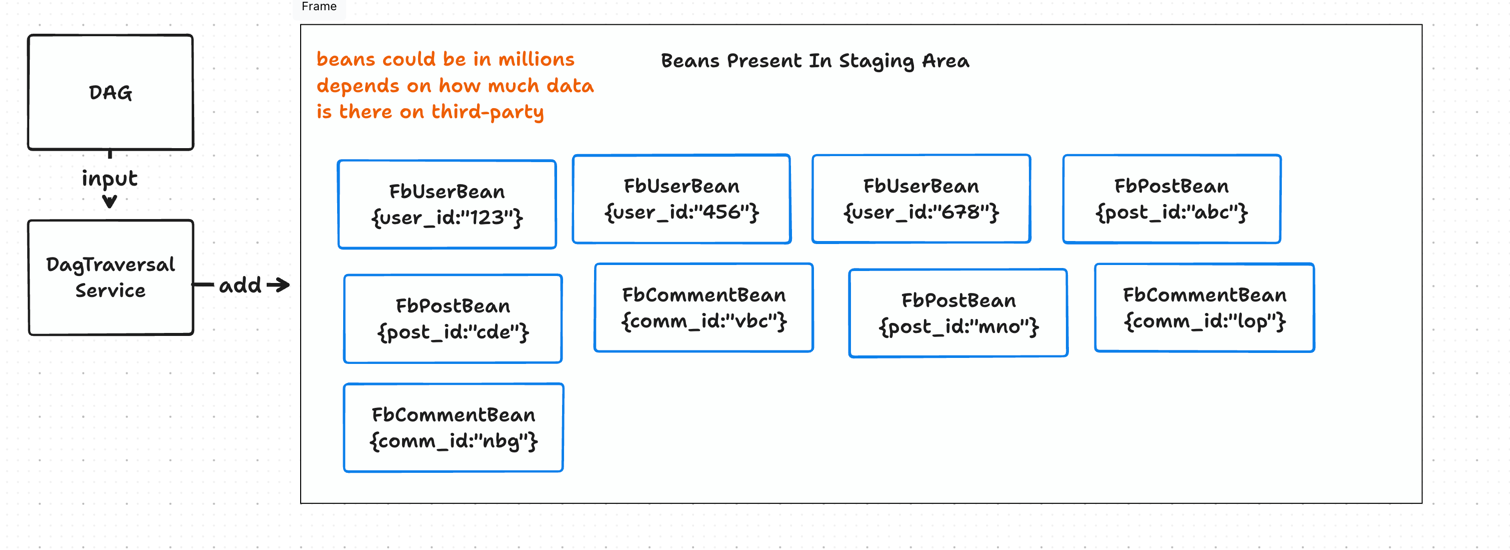
Once steps are declared, dev has to create bean classes for each of the step. Bean classes looks like this
@Getter
@Setter
@NoArgsConstructor
@JsonIgnoreProperties(ignoreUnknown = true)
public class FbUser extends AbstractBean {

    String user_id;
    String user_name;
}
AbstractBean and defines the attributes which needs to be kept in the system and discard others.
For instance - If your step named FbUser which extends AbstractStep fetches data like this
{
  "meta": {
    "token" : "some_token_here",
    "date" : "today_date"
  },
  "data" : [{
      "user_name" : "Amit Aggarwal",
      "user_id" : "some_fb_id_123455",
      "address" : "bangalore",
      "friends_count" : 100,
      "last_login" : "1 year back"
  },{
    "user_name" : "Praveen",
    "user_id" : "some_fb_id_098987",
    "address" : "Kerala",
    "friends_count" : 100,
    "last_login" : "2 year back"
  }]
}
if the data fetches by step fbUser from facebook like above then Hagrid will keep just user_name and user_id in the system and discard
rest of the attributes.
It is the responsibility of the dev to add the attributes with right naming convention so that deserlisation works. Hagrid internally uses Jackson for deserialization
so you can use all its features in beans
One more important thing to note, FbUser step has to override multiple methods inherited from AbstractStep class. One of the method which links
steps with beans is parseSyncResponse method.
Assets
Asset are the artifacts that you can consume. Assets are of two types primitive assets and non primitive assets.
Primitive Assets are created from beans while non primitive assets are created by joining two primitive assets
You can create an asset FbUserAsset which might be a direct mapping of a bean FbUserBean.
You can create an asset FbUserCommentAsset joining two primitve assets on some key like joining primitive FbUserAsset with primitive FbCommentAsset on user.user_id == comment.creator_id
It looks like this
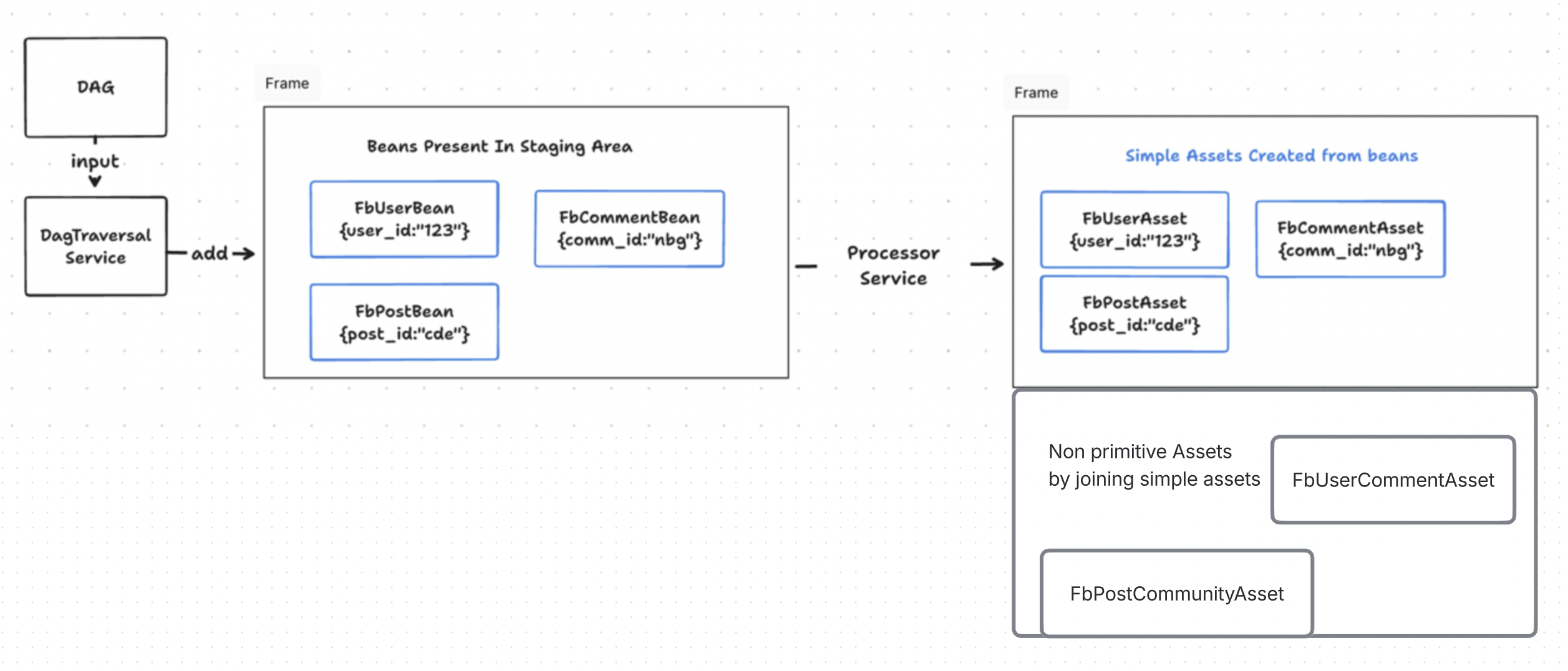
Once beans are defined, dev should define their primitive assets. Once primitive assets are defined then developer can create non primitive assets by using freshJoin as shown below in this doc.
Primitive Asset definition looks like this
If you notice the setFromBean parameter then we have passed a bean from which we want Hagrid to create this asset. If an asset definition has bean parameter then Hagrid consider it as primitive asset
@NoArgsConstructor
@Getter
@Setter
@JsonIgnoreProperties(ignoreUnknown = true)
@JsonInclude(JsonInclude.Include.NON_EMPTY)
public class FbUserAsset extends AbstractAsset {

    public void setFromBean(com.freshworks.hagrid.beans.User userBean) {

        userId = userBean.getUser_id();
        userName = userBean.getUser_name();
    }
}
Once you have defined the primtive assets then you can create non primtive assets like below
Non primitive Asset definition for complex asset may look like this
@FreshJoin(rightClass = FbCommunityAsset.class, rightClassFieldName = "creator_id", leftClass = FbUser.class, leftClassFieldName = "userId", uniqueJoinName = "user_community_join", join_type = FreshJoin.JOIN_TYPE.INNER_JOIN)

class UserCommunities{

    String communityOwner; // it would the userName from user bean
    String communityName;  // It would be the community name from community bean

   void setCommunityOwner(User user){
       this.communityOwner = user.getUserName();
   }

   void setCommunityName(Community community){
       this.communityName = community.getName();
   }
}