Performance Use cases
Hagrid has been optimise memory and CPU usages for all internal services and objects created.
Hagrid has minimal usage of instance variables , static variables within internal Hagrid classes ( to avoid memory leaks).
When developing a connector on Hagrid, Hagrid provides set of configurations to control the performance of the connector being developed on Hagrid. Some of these important configurations are
processor.poll_countinhagrid.ymlprocessor.number_of_parallel_processorinhagrid.ymlinfra.infra_typeinhagrid.yml@FreshHierarchyannotation overstep
Configuration Guidelines
Processor Poll Count
Take a look at Hagrid Design. It is based on producer & Consumer Model.
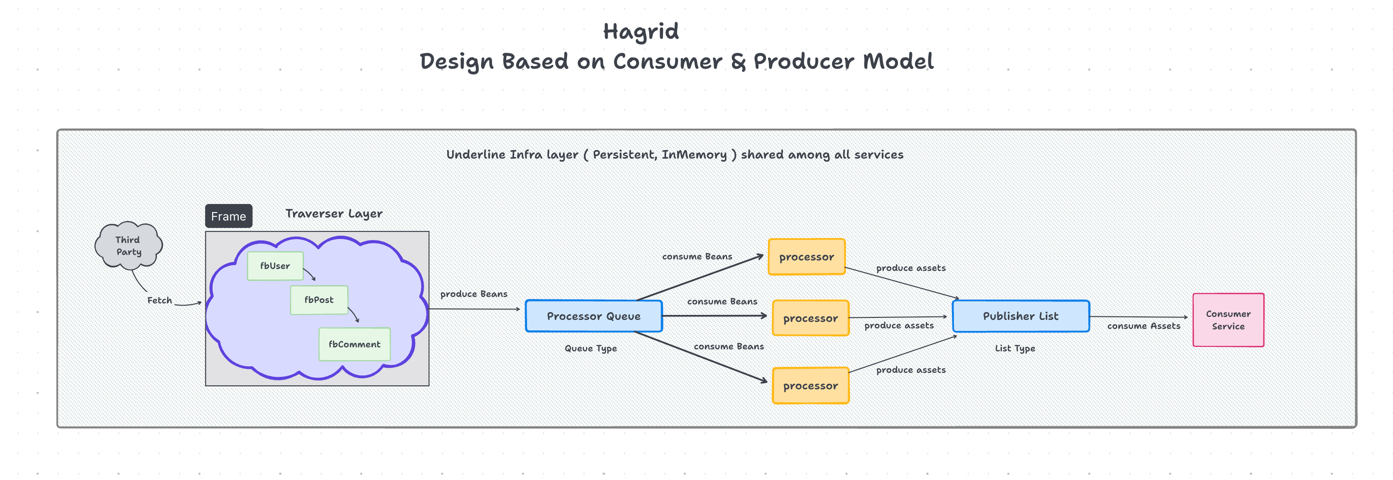
Configuration processor.poll_count and processor.number_of_parallel_processor in hagrid.yml defines how many beans
can be processed into assets concurrently by the service processor.
It is CPU intensive process and hence should be set based with the following guidelines
- If your pod has
High memory & Low CPUthen use lowprocessor.number_of_parallel_processorand highprocessor.poll_count - if your pod has
Low memory & High CPUthen use highprocessor.number_of_parallel_processorand lowprocessor.poll_count
if you are not sure which guideline you should go with, I would recommend to goahead with guideline number 1. It is always better.
Infra Type
As you can see in the below image of Hagrid design
All services across like TraverserService, ProcessorService, ConsumerService consume data and produce data. To save data
for processing, each services uses some kind of data structure like List, Queues , HashMaps.
These data structures implementations are provided by Hagrid internally. If you configure to run the connector on infra_type
memory then Hagrid inmemory driver will kick in and all data storage will happen on in memory list, queues and hashmaps.
If you chose to run the connector on infra_type persistent then Hagrid persistent driver will kick in and all data storage will
happen in MongoDB where it has implemented list , queues and HashMaps using collections of mongodb.
Given above information, choosing the right infra_type is important for the performance of your connector.
Here are some guidelines to choose the right infra type
- If the data fetched from
third-partyis less or minimal (few hundred kbs) then useinfra_typeasinmemory - If the data fetched from
third-partyis more then useinfra_typeaspersistent
Rate Limit via FreshHierarchy Annotation
First take a look at Hagrid high level design
Now if I expand the third-party to look like this
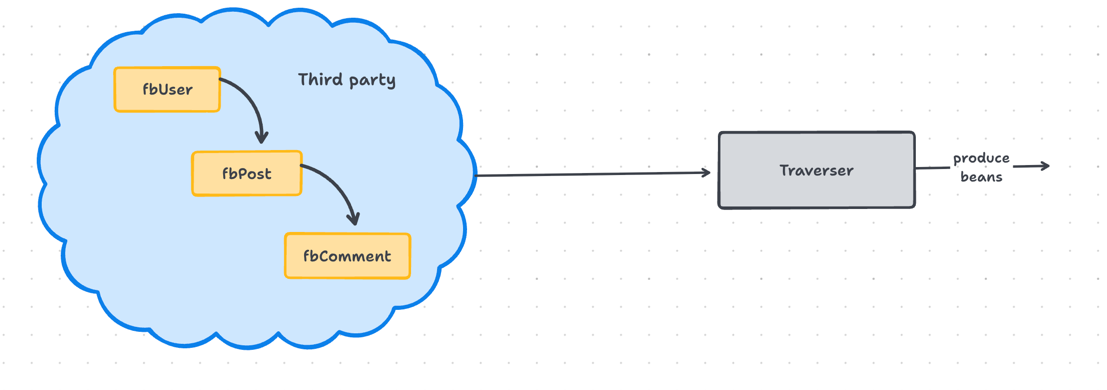
Based on this, connector would have three steps and each step should have @FreshHierarchy annotation of the top like this
@Slf4j
@FreshHierarchy(parentClass = FbUser.class, rateLimit = 200, duration = 30, ignore = false)
@Component
@Scope("prototype")
public class FbPost extends AbstractStep {

    // Override some methods here
}
Take a note at second and third parameter of @FreshHierarchy annotation. It defines
Rate Limit
rateLimit parameter of the @FreshHierarchy defines, how many parent items can be picked together and process concurrently.
In this context, given rate limit 200 in 30 seconds defines 200 post APIs can be fired in 30 seconds.
For this internally, Hagrid will pick 200 users beans (it means memory consumption) at once and spin 200 threads almost instantaneously
(it means CPU consumption) to execute Fbposts steps ( once for each user).
Based on the above scenario, you can see that given parameter rateLimit can have impact on memory and CPU together.
For clarifications once more on how it will impact memory and CPU
-
200 user beans will be fetched into the memory so that
FbPostcan be executed. If users beans areheavyassume 1MB then connector is bringing 200 * 1MB = 200MB data into the memory. Internally hagrid doestransformation,serialisation and deSerialisationso this can be multiplicative. Along with thisdatafetched from 200fbPostalso will be in the memory at this moment. -
200 rate limit will lead to spin of 200 extra threads onto the CPU. As there might be other threads are also there, adding 200 extra may lead to more
CPUcontext switchingand degraded performance.
Here are the guidelines for assigning the right rate limits for each step.
- If beans of a
parentstep are heavy ( anything more than few KB) then assignlowerrate limit on all itschild stepsso that child step pick only few parent beans for processing - If beans of a
parentstep are light ( few KBs ) then can assign higherrate limitson all itschild steps
In case you are not sure, always start with small rate limit, test it and then increase it. More rateLimit does not often
translates to better performance given every machine has limited resources.