Welcome
Reach out to the community via Google Groups.
If you have any question, need clarification or any feature idea, please mail at
users-hagrid@googlegroups.comwith your topic and get answers, ideas and suggestions from community members- Or just Subscribe to this group by sending an email at
users-hagrid+subscribe@googlegroups.comfor receiving any future communication. - Or to unsubscribe to this group by sending an email at
users-hagrid+unsubscribe@googlegroups.com
Introduction
Hagrid is a connector development framework written in JAVA and is available as SDK which can be installed via
maven or gradle.
Think of Hagrid framework, like spring boot for java based web applications, Django for python web applications then Hagrid for java based connector applications.
Like spring boot provides lots of classes and annotations to make web development seamless, similarly Hagrid framework provides many classes and annotations to create a connector application.
When explaining the working of Hagrid or any other concept of Hagrid through this documentation, we will take the example of developing a connector to fetch all users, posts, comments, community from Facebook.
We are taking facebook connector as example because almost everyone is familiar with facebook like users, posts, comments, communities.
Hagrid supports developing two kind of connectors, Lets call it
- HTTP Based Connectors - Connector which fetches data from third party via HTTP calls
- If you have http APIs avaialble to fetch data then your connector is going to be
HTTP Based Connector
- If you have http APIs avaialble to fetch data then your connector is going to be
- Non HTTP Based Connectors - Connectors which fetches data via different protocol like mysql
- If you do have
commandsavailable to fetch data then your connector is going to beNon Http Based Connector
- If you do have
Support for Use cases
Hagrid is a generic connector development frameworks. It means that you can develop any kind of connector on Hagrid.
For instance, you can use Hagrid to develop
- Connector to fetch
products from AWS ecommerce website - Connector to fetch
Users, usages , ACLfrom SSO services likeOkta - Connector to fetch
Files and ACLSfrom file services likesharepoint - Connector to fetch
schema and datafrom db services likemysql - Connector to crawl internet - yes this is also possible.
For this documentation, lets deep dive into our dummy facebook connector , which is going to a HTTP Based connector ( because I have set up some dummy APIs on EC2 for this example)
Think DAG
Think how APIs are organised of the third-party from where you would like to fetch data. Developers can identify this information easily from the documentation of the website of the third party.
For facebook example, we can assume DAG will look like this.
As per above DAG, we want to develop a connector which should follow this traversing mechanism
- Connector should first fetches
usersof facebook. - Connector should fetch
postsandcommunitiescreated by eachuserfetched in step 1. - Connector should fetch
commentsmade on thepostfetched in the step 2.
Another example, say you want to develop a connector to fetch data from mysql then in this case DAG may look like this
Mysql Connector
Dag to fetch the tables and Records from mysql may look like this
As per above DAG, we want to develop a connector which should follow this traversing mechanism
- Connector should first fetches
databasesfrommysql - Connector should fetch
permissionsandTablesfor eachdatabasefetched in step 1 - Connector should fetch
PermissionandRecordfor eachTablefetched in step 2
Note: : Above DAGs are just for example. Your DAG and process may look little different than presented in this example
For now, lets continue with developing our facebook connector
How does it work
Before I take you through the development of our facebook connector, I would like to introduce you to the main concepts of Hagrid.
Once you understand these concepts then you can develop any connector easily. I have divided the concepts of Hagrid in two categories
- Connector Configuration
- Connector Execution
Connector Configuration involves the concepts which are needed to configure the connector, basically letting Hagrid framework know that you should behave like this, fetch only so much data from third-party and combine the fetched data in this way so that I can get the desired output.
Connector Execution involves the concepts which describe how I as a developer want to execute the Hagrid and consume the data to send it to my application layer to store in some business DB.
Connector Configuration
Like I said above, configuration of the connector means answering three main questions
- How Hagrid should fetch the data from third party?
- Out of data fetched, which data should Hagrid keep it with itself and which should be ignored i.e dropped ?
- Once only important data is there, how should Hagrid combine / transform this data into meaningful business objects.
Hagrid provides three main concepts which allow developers to configure the answers of the above questions. These three concepts are
- Steps - Defines how data should be fetched from third party
- Beans - Defines, which data (fetched via steps) should be kept and which should be ignored
- Assets - Combine and Transform data into something meaningful to the business.
Lets go through each concept one by one.
Steps
Here are some rules that you should follow to let hagrid know the answer of the question how to fetch data from third party
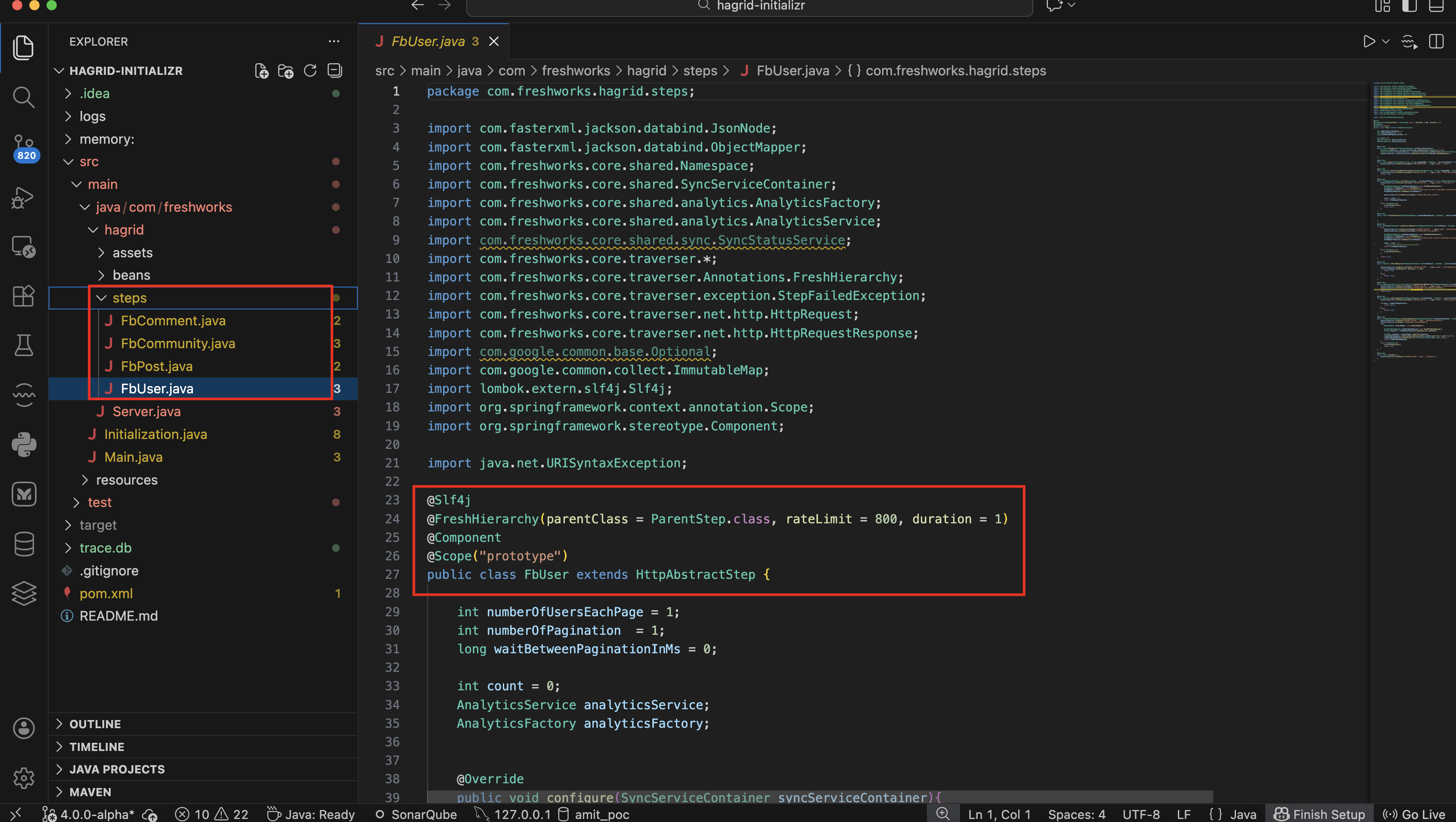
- Translate each API Call ( or DAG Node ) to one
javaclass (likeFbStepUser.java,FbStepPost.java) in you java project. - Use annotation
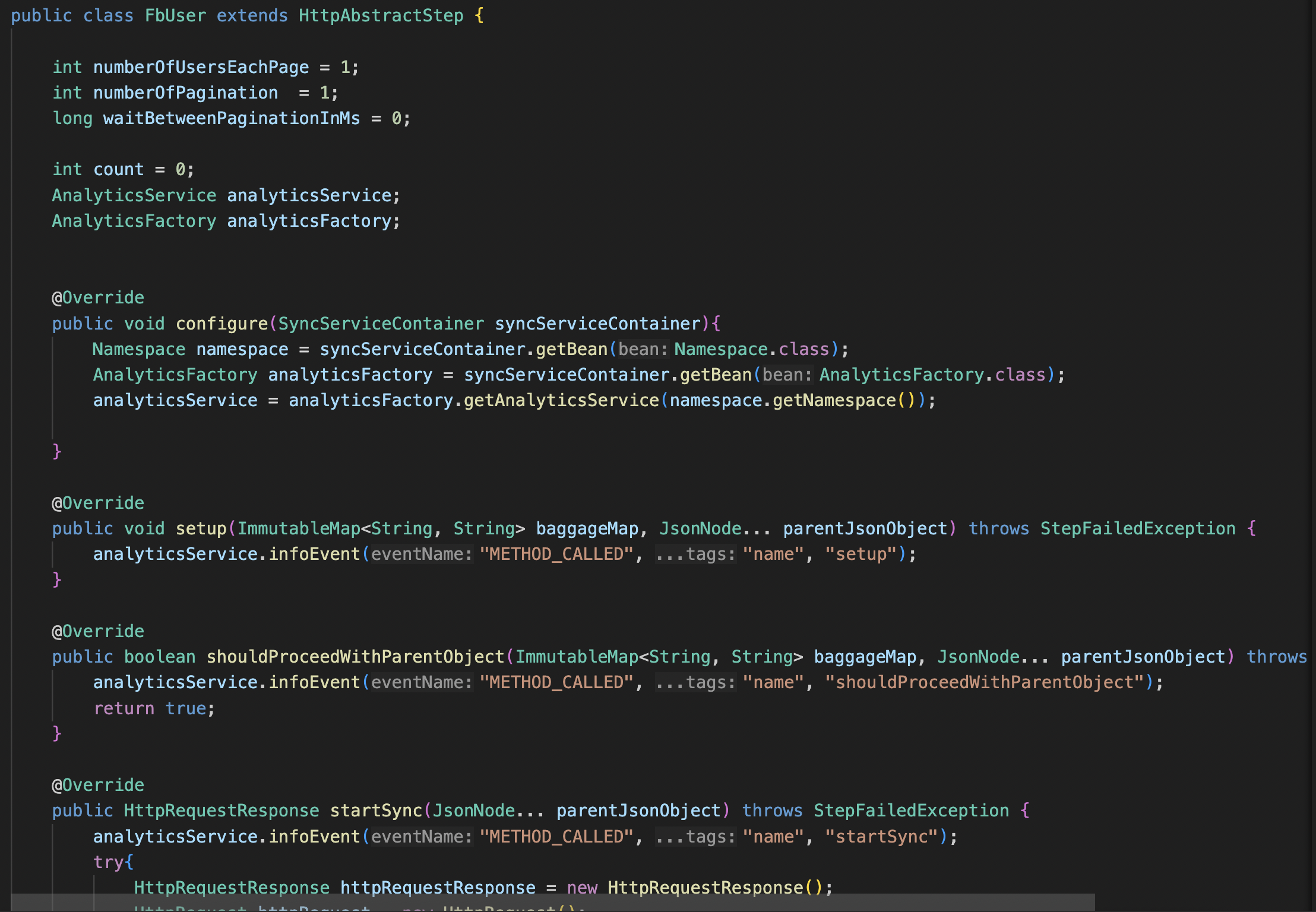
@FreshHierarchyon the top of eachstepclass to setup the order in which they should be called. Click to know more about @FreshHierarchy. - Each step class extends either
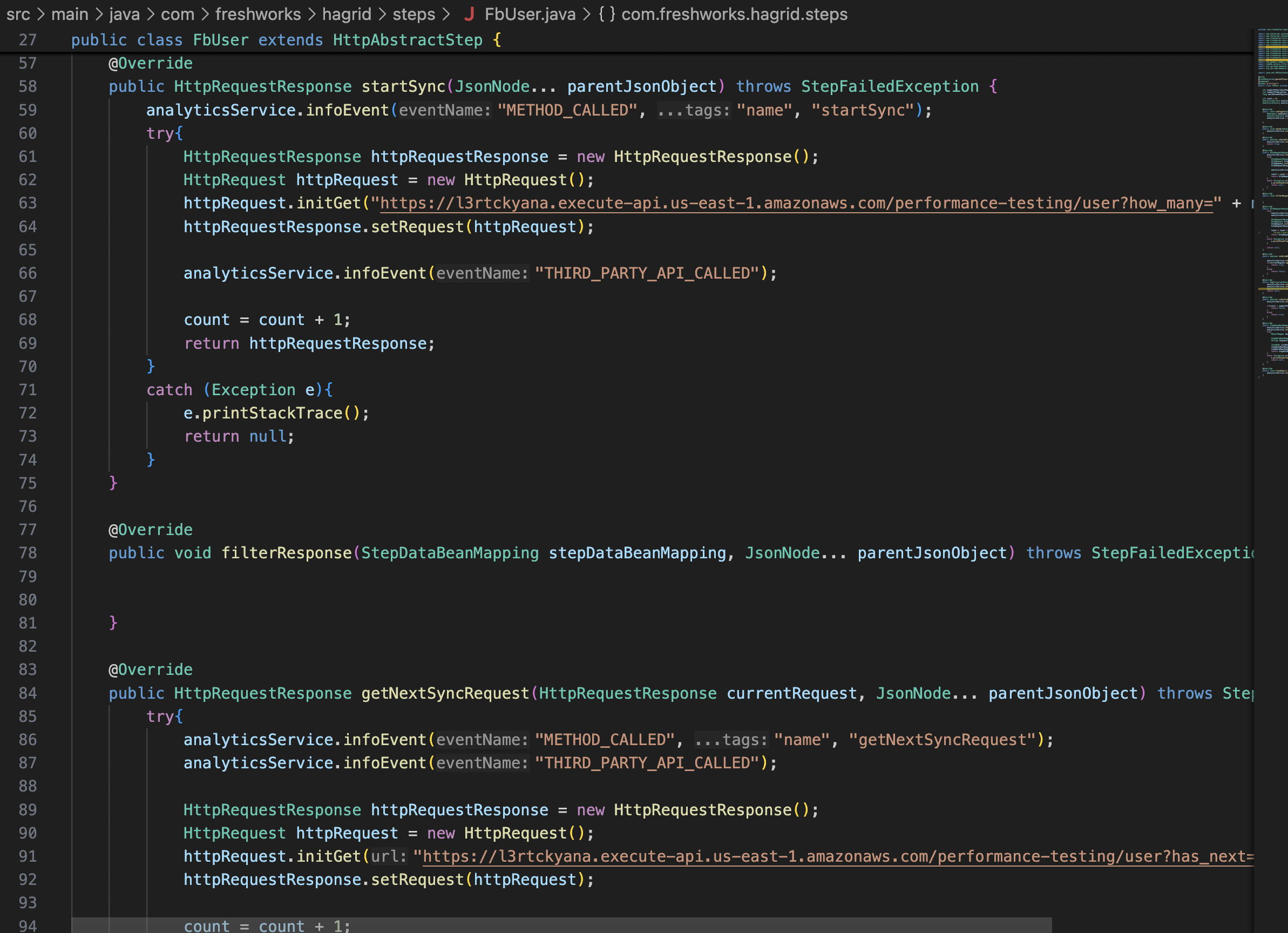
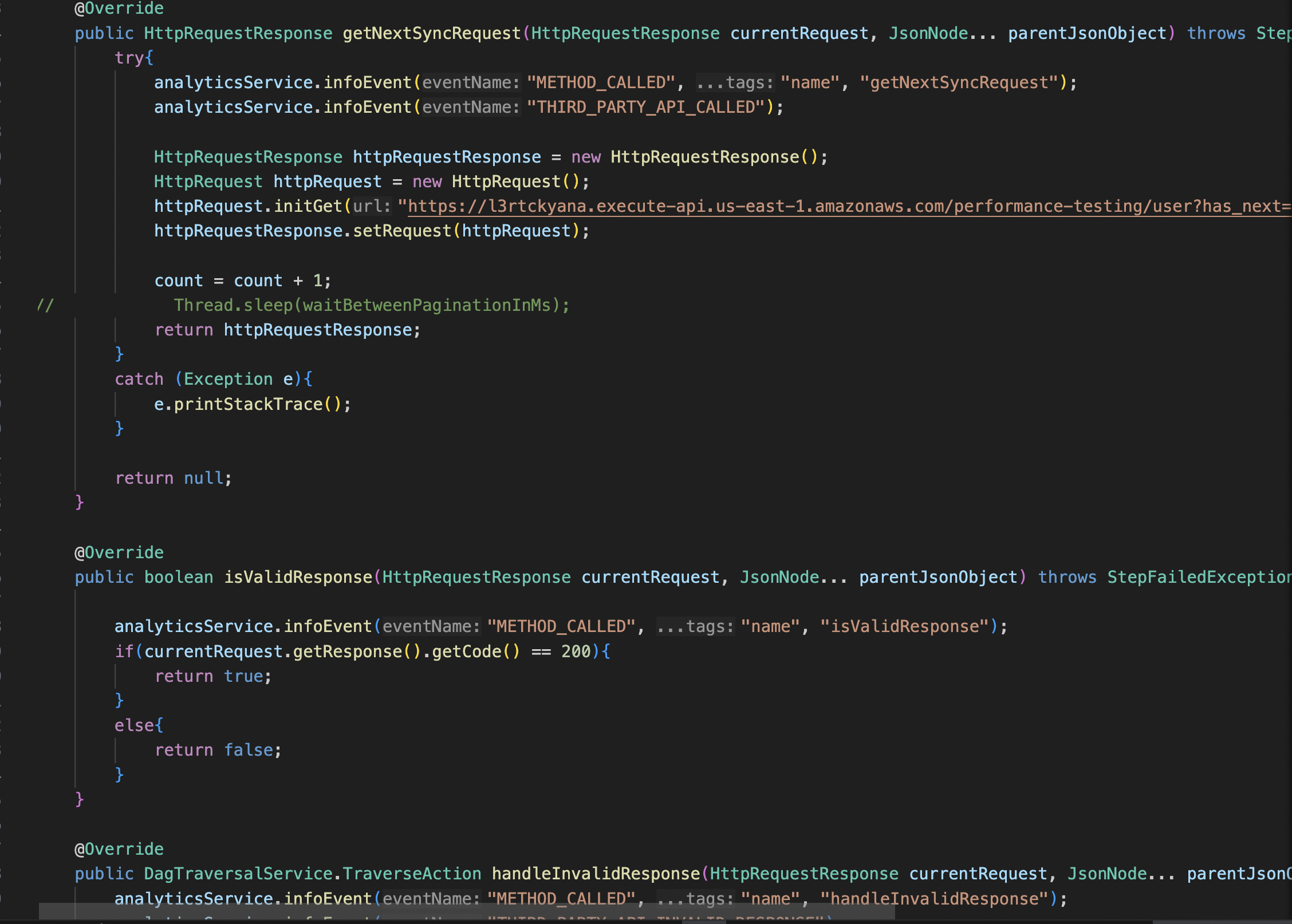
HttpAbstractClassorNonHttpAbstractClass. These classes defines different method which you can override to change the behaviour of Hagrid based on requirements. - Various methods that you can override are listed here Step & Its Methods
Watch series of screenshots which helps you visualize how steps are organised
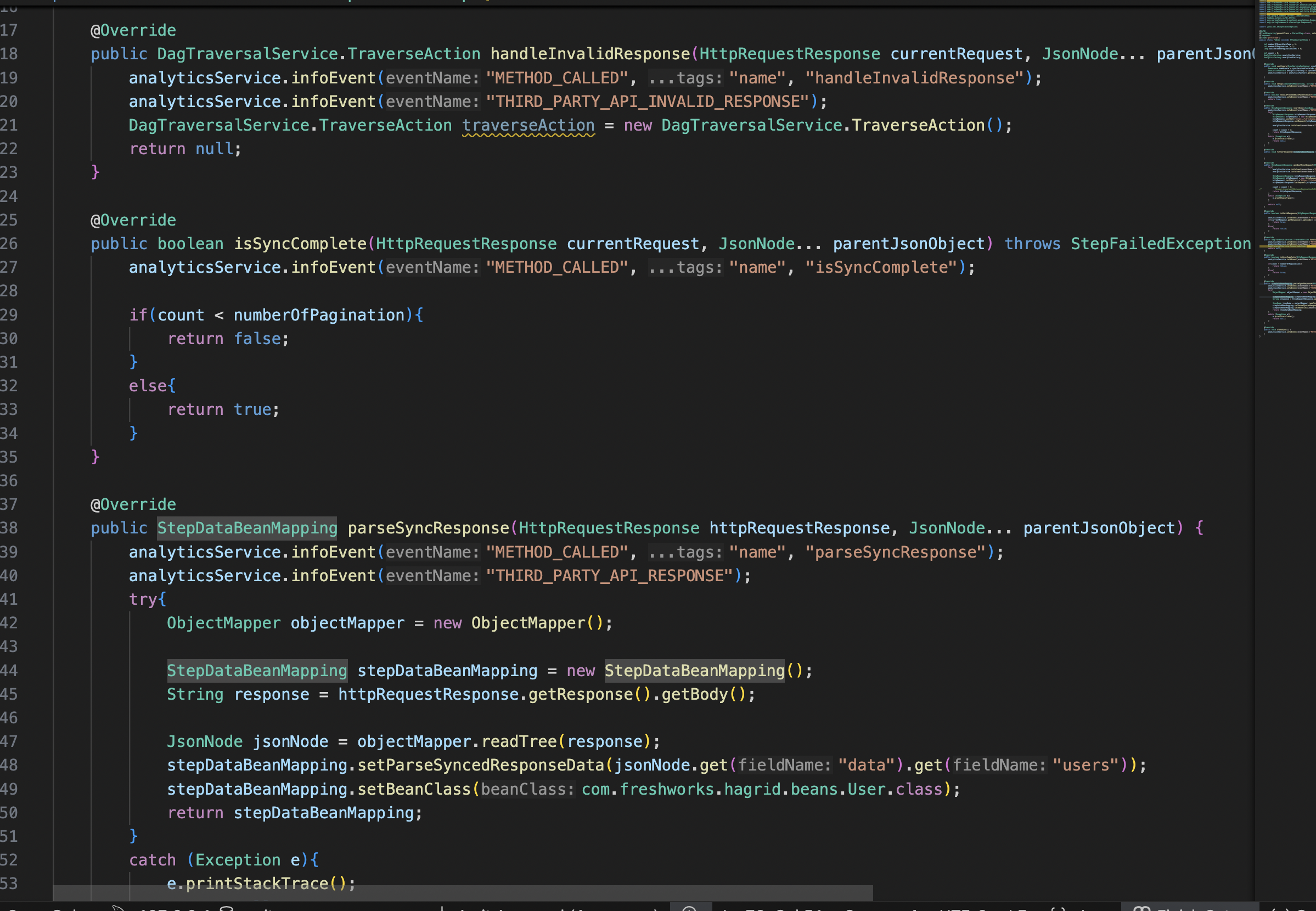
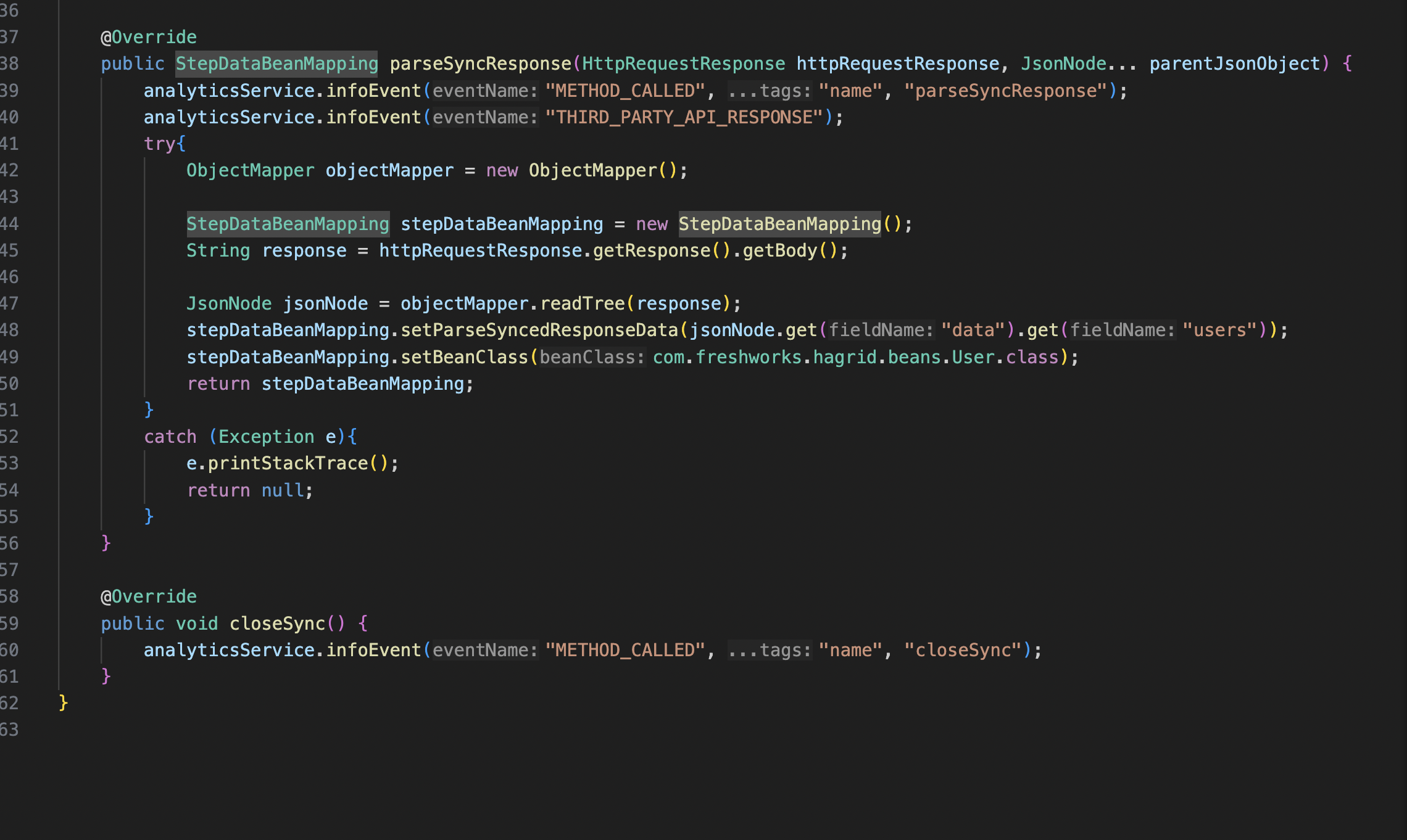
Beans
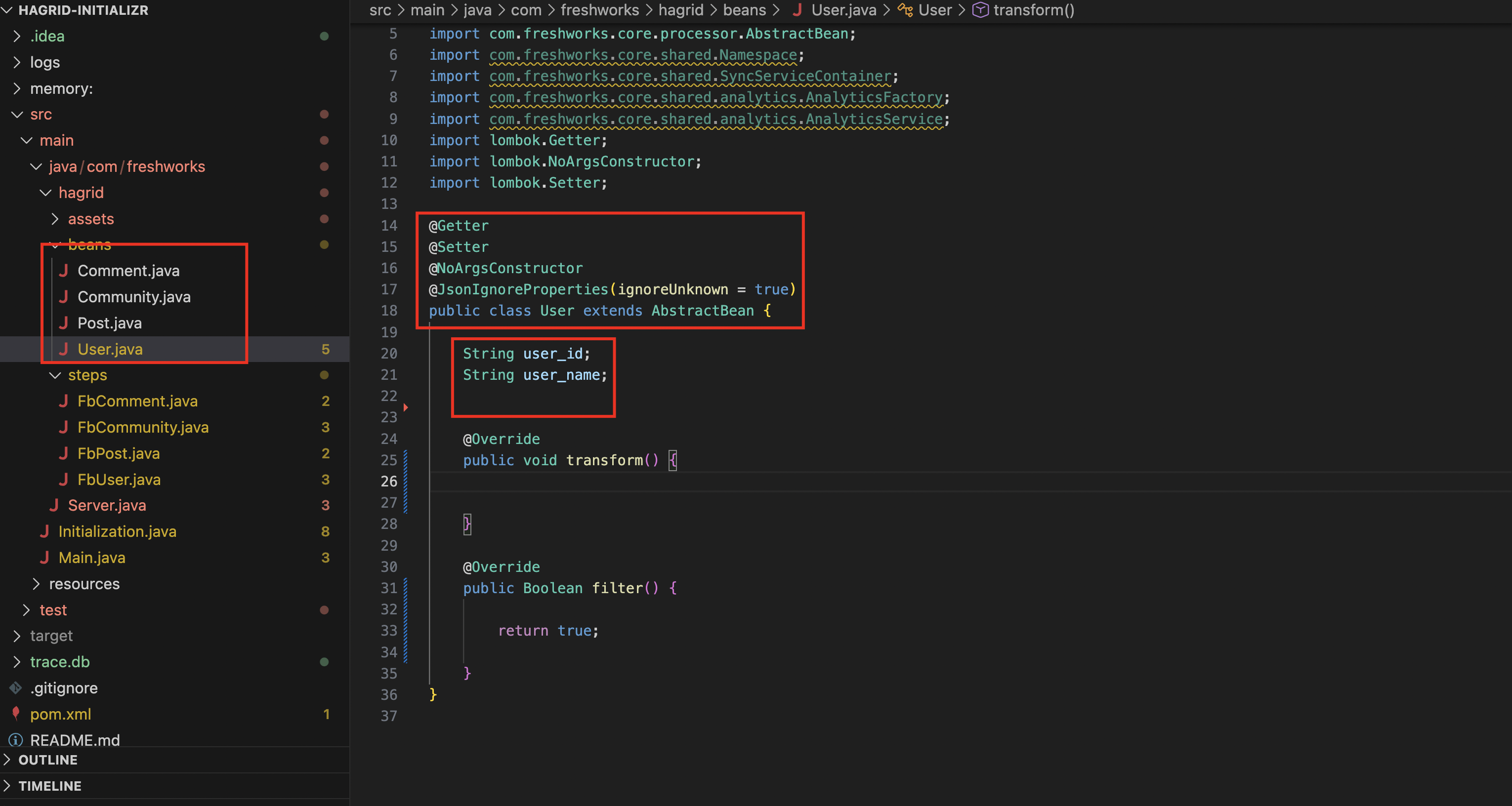
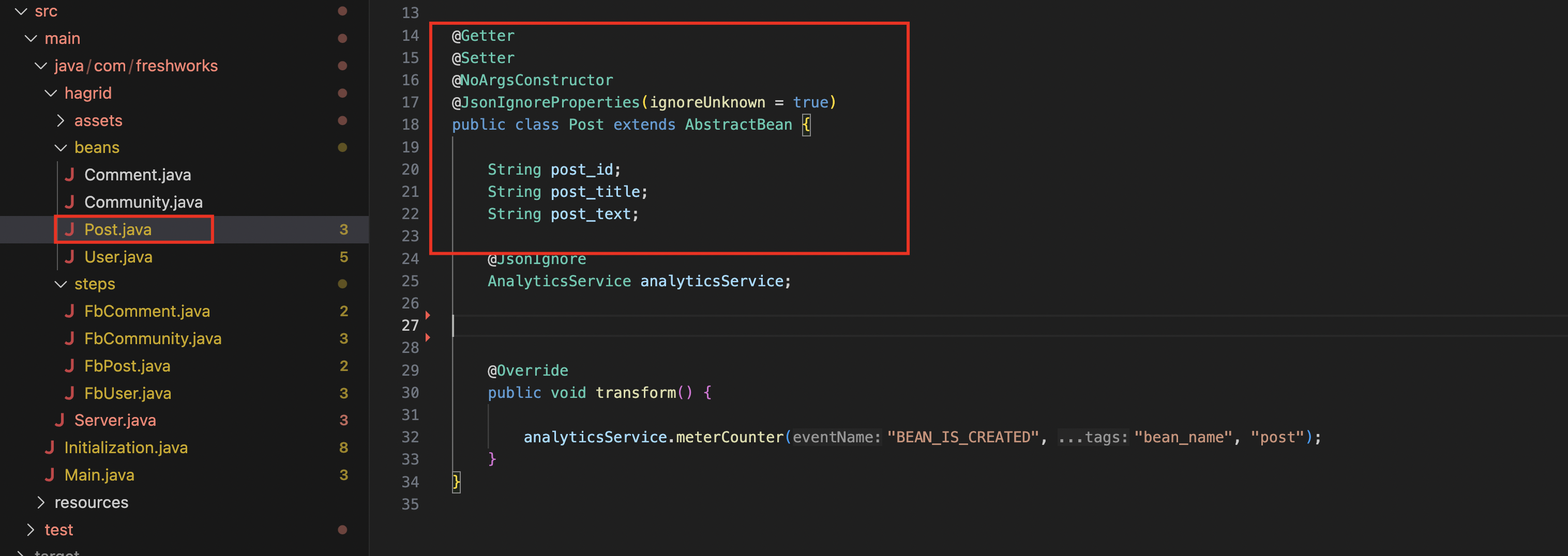
- Think of it like data layer where Hagrid stores all fetched API data.
- Each
stephas its correspondingbeanclass. - Bean class consists of attributes that you would like to keep.
- Suppose step
FbStepUser.javahas corresponding bean classFbBeanUser.java FbBeanUser.javahas following attributesString user_nameandString email_id- When step
FbStepUserfetches data of the form say[{user1},{user2},{user3}] - Hagrid will deserialize this array of JSON into 3 beans of
FbBeanUser. - If there is any attribute in
{user1}which is not defined inFbBeanUserthen that will be ignored.
- Suppose step
- So when connectors runs, it generates thousands and millions of beans ( depends on data fetched by steps)
- Beans are intermediate object, not consumeable by developers to send to their business applications.
For better understanding please take a look at this visual diagram
Assets
Think of asset classes like Bean classes except these major differences
- Asset object is again a
javaclass which set of attributes defined in it, just like beans - Asset object could be of
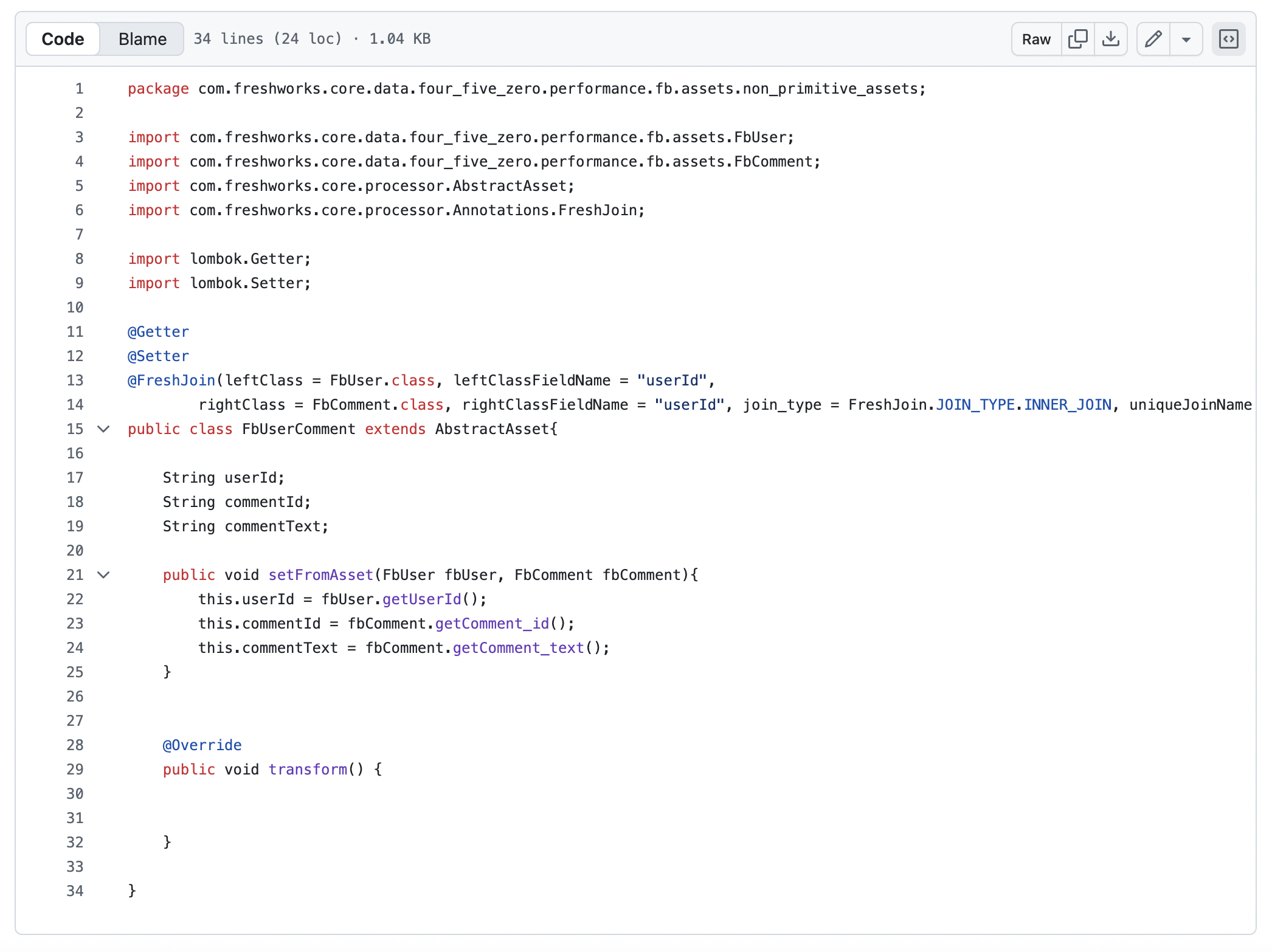
primitiveornon primitivetype. Primitive Assetsis just a translation of Bean attributes to asset attributes.Non Primitive Assetsis formed by combining the twoprimitiveassets using annotationFreshJoin- Assets are consumable by developer to send it to their business application
For better understanding please take a look at this visual diagram
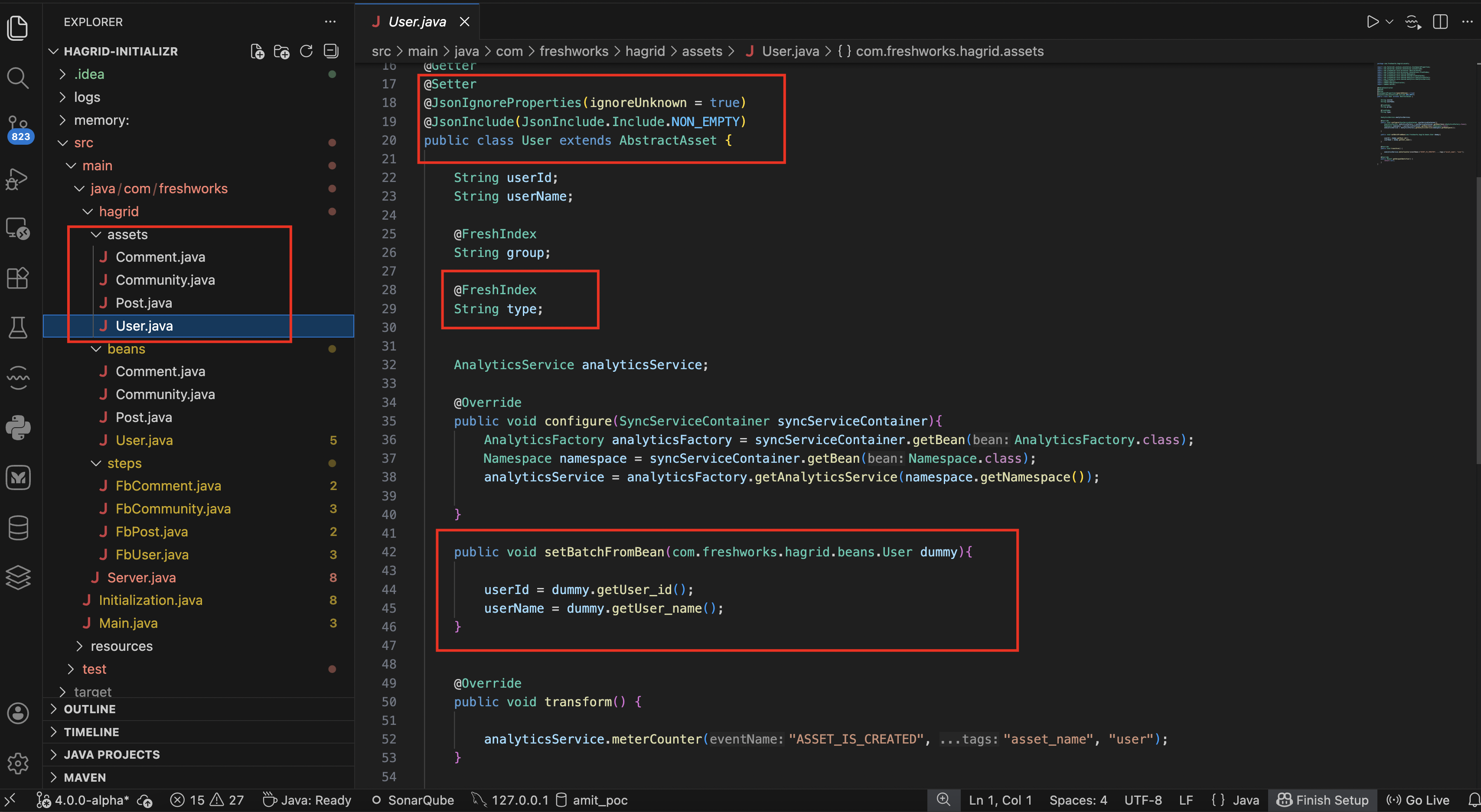
Watch below series of screenshots to understand how assets are organised in code
For primtive asset
For non primitive asset
Once you have configured steps, beans and assets then the configuration part of the connector is completed.
Connector Execution
Once the connector configuration is understood, next question is
- How do I run hagrid ?
- How do I consume assets that are generated by the Hagrid.
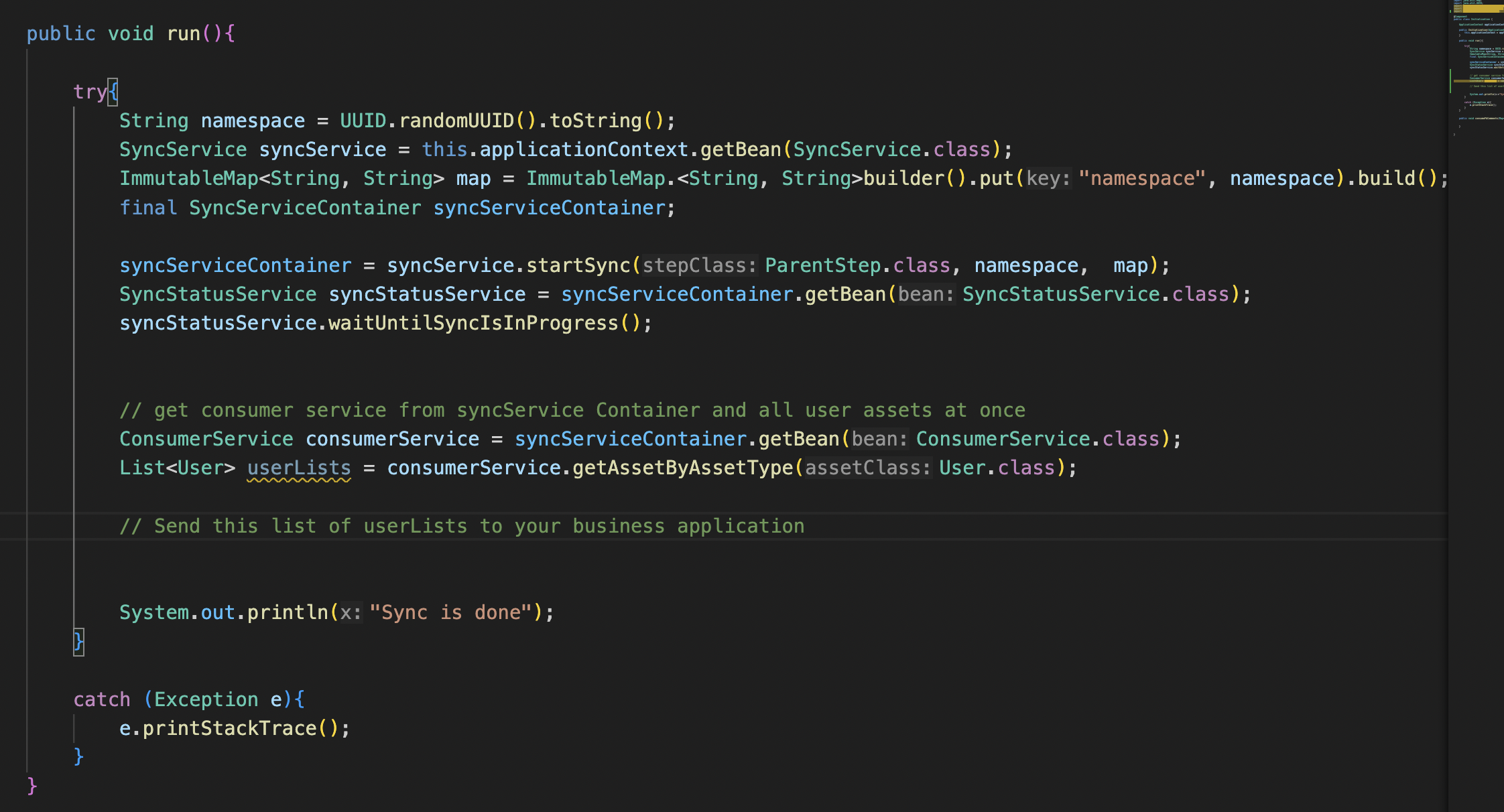
Connector Execution address these two questions. For connector execution phase, Hagrid exposes four important services
SyncServiceSyncContainerServiceSyncStatusServiceConsumerService
Lets understand the functionality of these services so that we can get the answers of the above two questions
SyncService
SyncService is the top level service of Hagrid framework which is exposed as prototype bean of spring boot framework.
Whenever a develop want to run Hagrid then they must take SyncService object from spring application context.
SyncService exposes methods to kick start the Hagrid sync. It exposes methods like startSync , initSyncServiceContainer etc.
SyncServiceContainer
Inspired from spring application context , Hagrid returns SyncServiceContainer for each call to syncService.startSync or syncService.initSyncServiceContainer .
SyncServiceContainer contains instances of the internal services that are instantiated as a part of this sync.
Developers uses SyncServiceContainer to get various services from SyncServiceContainer to look into various aspects of the Hagrid.
For example - Once you get the SyncServiceContainer then you can extract consumerService which is required to consume the generated assets.
Once you have SyncServiceContainer then you can extract SyncStatusService to look into the current running status of the Hagrid
Once you have SyncServiceContainer then you can extract the InfraService to look into the data fetched so far by Hagrid.
SyncStatusService
SyncStatusService exposes various methods to know the status of Hagrid . These methods are
getSyncStatus- It gives you following status- 1 - If sync is successful
- 0 - If sync is running
- -1 - If sync has failed
waitUntilSyncIsInProgress- After running Hagrid, block the thread until Hagrid is in progress
ConsumerService
ConsumerService exposes various methods to consume assets generated by Hagrid. These methods are
getAssetByAssetType- Provide you list of all the assets (of a given class) that are fetched till now by Hagrid. This API is called usually once Hagrid is done.getAssetByAssetTypeAndFilter- Provide you list of all the assets ( of a given class) and filtered by given expression that are fetched by the Hagrid till now. This API is called usually once Hagrid is done.streamAssetByAssetType- Provide you list of all the assets that has been fetched so far. This API works on token basis and this API can be called even when Hagrid is still in progress
For indepth understanding of how we can consume assets, please take a look at consumer details
Watch series of below screenshots on how connector execution phase works
Summary
With this basic idea of how Hagrid works, here I would like to summarize few things
Hagridis generic connector development framework.- To develop connector on Hagrid, think in terms of
DAGi.e. how does API calls are arranged. Each nodeinDagis going to be astepin Hagrid.FreshHierarchyannotation helps Hagrid to organised nodes inDAG.- Enrich your steps by overriding method from parent class
AbstractStepso thatHagrid- Knows the
URLfrom where to fetch the data - Knows how to form next url in case of
pagination - Knows how to handle if there is
non200 http response - Filter data and attributes which is of no interest
- Knows the
With the basic understanding of Hagrid, next move to Set up to set up a playground so that we can do practical with Hagrid framework and understand its working better.
Please reach out to the community for any suggestions and questions at community-email