Step Use Cases
Access Hagrid Internal Services
In each step, developer can access Hagrid's internal services via service SyncContainerService. Each step inherits a method called
getSyncContainerService() from parent class AbstractStep.
Using method getSyncContainerService(), developer can access the sync container. Once developer has the syncContainerService, any internal service
can be accessed like this
SyncContainerService syncContainerService = getSyncContainerService();
SyncService syncService = syncContainerService.getBean(SyncService.class);
AnalyticsFactory analyticsFactory = syncContainerService.getBean(AnalyticsFactory.class);
Namespace namespace = syncServiceContainer.getBean(Namespace.class);
AnalyticsService analyticsService = analyticsFactory.getAnalyticsService(namespace.getNamespace());
Inject Services In Step
In some scenarios, dev want to inject the instances of their services. You can do that like you do it with any Spring boot
managed instance. Hagrid internally creates the object of the step via Spring boot.
Avoid Concurrency Issues
Hagrid is highly multithreaded framework. It process many instances of parent node in parallel. For instance - Hagrid
process multiple fbUser to fetch fbPosts in parallel. Sometimes, dev create instance variables like int counter in step
class to count number of APIs called or number of APIs failed or number of re-tries.
If your steps are not @Scope("prototype") then this may lead to concurrency issues. So always make your steps of type prototype
like below
@Slf4j
@FreshHierarchy(parentClass = FbPost.class, rateLimit = 800, duration = 1, ignore = false)
@Component
@Scope("prototype")
public class FbComment extends AbstractStep {

}
Save Data Token
There might be the cases, where you want to save auth token for the current sync. You can achieve this by injection services like
Google Guava cache in the steps constructor and use it for the lifecycle of the step
Along with this, you can save data using infra that Hagrid uses for itself for storing sync data temporary.
Starting from Hagrid 3.3, a new method is introduced configure(SyncContainerService syncContainerService). This syncContainerService
is the container from which you can extract any service that hagrid has initialised and uses for this running sync.
More information about syncContainerService is here
When Hagrid runs the sync then it creates a container named SyncServiceContainer specifically for this particular sync.
Hagrid adds all services that it initialized for this sync into this container. It is very much like Spring
ApplicationContext container.
However, there is one difference, Spring container is init only once per Java application, SyncServiceContainer of hagrid is
different for each sync that it runs.
If you have access to SyncServiceContainer, you can access any internal service that hagrid has intialized to run this sync.
Below is the visualisation of the SyncServiceContainer
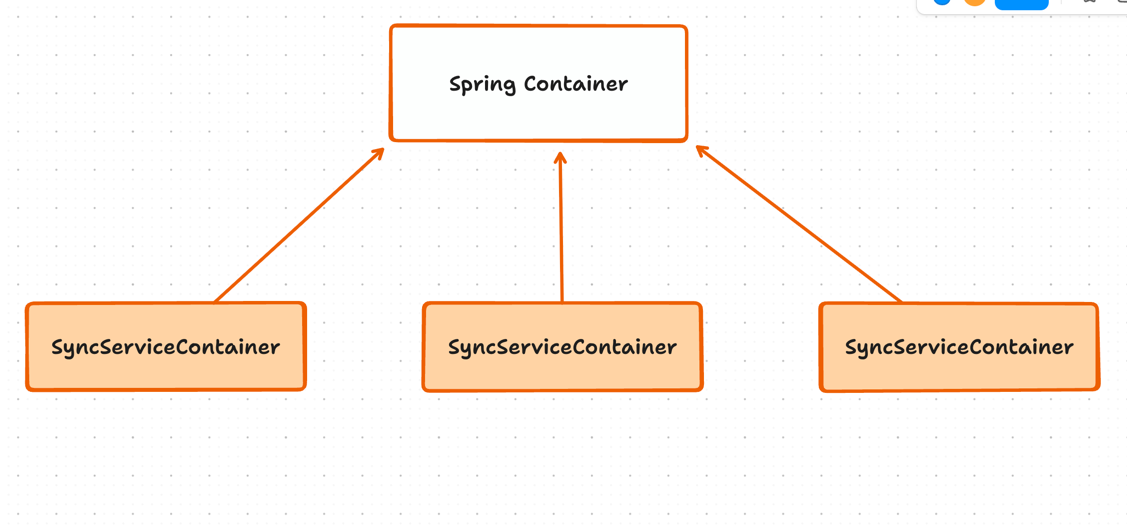
SyncServiceContainer exposes two methods via which you can fetch any service.
Suppose you want to fetch TraverseConfigService to configure dynamic rate limit then you can use SyncServiceContainer
like below
TraverseConfigService traverseConfigService = syncServiceContainer.getBean(TraverseConfigService.class);
traverseConfigService.setStepRateLimit(FbUser.class, 200, 20);
If you fetch some service which is not Hagrid Managed then getBean method of the SyncServiceContainer service will
automatically fetch is from Spring Application Container
Below is the demonstration on how you can use syncContainerService to fetch InfraService.
@Slf4j
@FreshHierarchy(parentClass = FbPost.class, rateLimit = 800, duration = 1, ignore = false)
@Component
@Scope("prototype")
public class FbComment extends AbstractStep {

    @Override
    public void configure(SyncServiceContainer syncServiceContainer) {
        InfraBeanConfiguration infraBeanConfiguration = syncServiceContainer.getBean(InfraBeanConfiguration.class);
        InfraService infraService = infraBeanConfiguration.getInfraService();
        InfraDbList infraDbList = infraService.getInfraDbList("list_name");
    }

}
Once you get the InfraDbList i.e. List implementation then you can store and fetch any data like you are doing in Java Lists
Back off Retry
In some scenario, dev may want to try at max maxRetry times before moving to next parent object. This can be achieved by
creating a currentReTry instance variable this step.
Whenever, there is invalid response then wait for currentReTry * backOffInSecs seconds and then re-try. Code will look like this
@Override
    public DagTraversalService.TraverseAction handleInvalidResponse(HttpRequestResponse currentRequest, JsonNode... parentJsonObject) throws URISyntaxException, StepFailedException {
        analyticsService.infoEvent("METHOD_CALLED", "name", "handleInvalidResponse");
        analyticsService.infoEvent( "THIRD_PARTY_API_INVALID_RESPONSE");


        if(currentRetry < maxRetry){

            DagTraversalService.TraverseAction traverseAction = new DagTraversalService.TraverseAction();
            traverseAction.holdAndReTry( currentRetry * backOffInSecs , TimeUnit.SECONDS);
            return traverseAction;
        }

        else{

            DagTraversalService.TraverseAction traverseAction = new DagTraversalService.TraverseAction();
            traverseAction.abortCurrentParentAndContinueWithNextParentInstance();
            return traverseAction;
        }

    }
Configure Rate Limit
Suppose you created a step which calls a facebook community API. However, facebook has put a rate limit of 200 API
every 20 secs. To configure it with Hagrid just put these limits in @freshHierarchy annotation like this
@Slf4j
@FreshHierarchy(parentClass = FbUser.class, rateLimit = 200, duration = 20, ignore = false)
@Component
@Scope("prototype")
public class FbCommunity extends AbstractStep {

}
Note: : As Hagrid is multi-threaded application, there is no guarantee that rate-limit will not be breached.
rate-limit can be breached due to multiple threads running in parallel and cause some delays. However, if it is the
absolute requirement then I would recommend to provide 10%-30% less rate limit quote to Hagrid.
Creating URL from Previous Response
When you have the pagination use cases and would like to create a URL for the next page, this is how you can do it
class FbComment extends AbstractStep{

    // Other methods are omitted for clarity

    @Override
    public Optional getNextSyncRequest(HttpRequestResponse currentRequest, JsonNode... parentJsonObject) throws StepFailedException {
        try {
            analyticsService.infoEvent("METHOD_CALLED", "name", "getNextSyncRequest");
            analyticsService.infoEvent("THIRD_PARTY_API_CALLED");

            JsonNode postData = parentJsonObject[0];
            String postId = postData.get("post_id").asText();

            String commentResponseBodyOfLastRequest = currentRequest.getResponse().getBody();

            // Here use the postId , token from commentResponseBodyOfLastRequest and create a new URL
        }
}
Dynamic Rate Limit
With dynamic rate limit, you can set the rate limit for each step at run time. Currently, Hagrid allow you to do that using
FreshHierarchy annotation. However the limitation of this is that you have to hardcode the rate limit for each step before hand.
There are the use cases, where in rate limit for each step can changes based on the custom account.
To support such use cases, you can take the benefit of dynamic rate limit feature.
It is here, how it works
Following is the way in which dynamic rate limit can be configured by dev:
public void some_app_method(){

    SyncServiceContainer syncServiceContainer = syncService.initSyncServiceContainer("namespace here");
    TraversConfigService traverConfigService = syncServiceContainer.getBean(TraverseConfig.class);

    traverseConfigService.setRateLimit(FbUserStep.class, 200, 20);

    syncService.startSync(syncServiceContainer, FBUser.class, baggageMap);

}
Here, to configure any part of the Hagrid before starting the sync, SyncServiceContainer can be retrieved via the newly introduced method named initSyncServiceContainer.
Once syncServiceContainer is available, configuration services like TraverseConfigService, ProcessorConfigService, InfraConfigService can be configured.
Once syncServiceContainer is configured, then start the sync with this syncServiceContainer.
DSR for this is available at github link
Organising Steps in Multiple Packages
Suppose there is a folder structure like this:
Hagrid
├── steps
│   ├── salesforce
│   │   ├── Step_1.java
│   │   ├── Step_2.java
│   ├── Zoom
│       ├── Step_1.java
│       ├── Step_2.java
│       ├── Step_3.java
├── Beans
│   ├── Salesforce
│   │   ├── Bean_1.java
│   │   ├── Bean_2.java
│   ├── Zoom
│       ├── Bean_3.java
│       ├── Bean_4.java
├── Assets
│   ├── Salesforce
│   │   ├── Asset_1.java
│   │   ├── Asset_2.java
│   ├── Zoom
│       ├── Asset_1.java
│       ├── Asset_2.java
In such cases, the following step_path, bean_path, and asset_path can be provided:
---
configuration:
  connector:
    step_path: "com.freshworks.hagrid.steps"
    bean_path: "com.freshworks.hagrid.beans"
    asset_path: "com.freshworks.hagrid.assets"
Just providing the top-level path for steps, beans, and assets would suffice for scanning all inner packages.
Interrupt Sync from step Methods
Suppose you want to interrupt sync in one of the step method as some business condition is not met. Then you can follow like this
    DagTraverserService dagTraversalService;
    SyncService syncService;

    // In step configure method fetch services from syncServiceContainer
    @Override
    public void configure(SyncServiceContainer syncServiceContainer) {
        this.syncServiceContainer = syncServiceContainer;
        AnalyticsFactory analyticsFactory = syncServiceContainer.getBean(AnalyticsFactory.class);
        Namespace namespace = syncServiceContainer.getBean(Namespace.class);
        this.analyticsService = analyticsFactory.getAnalyticsService(namespace.getNamespace());
        this.infraService = syncServiceContainer.getBean(InfraService.class);
        dagTraversalService = syncServiceContainer.getBean(DagTraversalService.class);
        syncService = syncServiceContainer.getBean(SyncSerice.class);
    }

    // Suppose you want to interrupt sync in parseSyncResponse
    @Override
    public StepDataBeanMapping parseSyncResponse(HttpRequestResponse httpRequestResponse, JsonNode... parentJsonObject) {
        analyticsService.infoEvent("HAGRID_DURABILITY_EVENT", "step", this.getClass().getName(), "method", "parseSyncResponse");
        analyticsService.infoEvent("STEP_METHOD_CALLED", "name", "parseSyncResponse");
        analyticsService.infoEvent("THIRD_PARTY_API_RESPONSE");
        try{

            ObjectMapper objectMapper = new ObjectMapper();
            StepDataBeanMapping stepDataBeanMapping = new StepDataBeanMapping();
            String response = httpRequestResponse.getResponse().getBody();

            if(response.equals("")){

                // Here you are interrupting just traverser module, however processor module will keep running
                dagTraversalService.interruptSync();

                // To shutdown both traverser and processor
                syncService.interruptSync();
            }


            JsonNode jsonNode = objectMapper.readTree(response);
            stepDataBeanMapping.setParseSyncedResponseData(jsonNode.get("data").get("users"));
            stepDataBeanMapping.setBeanClass(FbUser.class);
            return stepDataBeanMapping;

        }
        catch (Exception e){
            e.printStackTrace();
            return null;
        }
    }
Do not make this bean available to Child Nodes
We have parseSyncResponse method in steps, which decides how this httpRequestResponse body should be parsed and rendered into which bean class.
So it is possible for a dev that for a given http request response body, breaks into multiple json responses and render into respective beans. For instance - Suppose we get the following data from third-party
  {
    "post_id" : "1234",
    "post_title" : " Having good vacations",
    "post_description" : " vacation in India",
    "total_likes" : 100
    "total_comments" : 50
  }
Assume, two kind of beans are available
PostBean.java
    public class PostBean extends AbstractBean{
        String postId;
        String postTitle;
        String postDescription;
    }
MetricBean.java
public classs PostMetricBean extends AbstractBean{
    String postId;
    int total_likes;
    int total_comments;
}
In the above case, dev may parse the json response into any of the two JsonNodes , one for PostBean and PostMetricBean , however to fetch comments in the next child node only PostBean is needed not the PostMetricBean .
Pushing PostMetricBean as parentData for next node could lead to potential run time errors.
As described above, it is important to allow dev to mark particular data that he want to publish as bean but do not want them as parentNode data for its child node.
this can be done by using the method of StepDataBeanMapping class isPassToChildNodes . Set it to false if you do not want this node to pass to child nodes